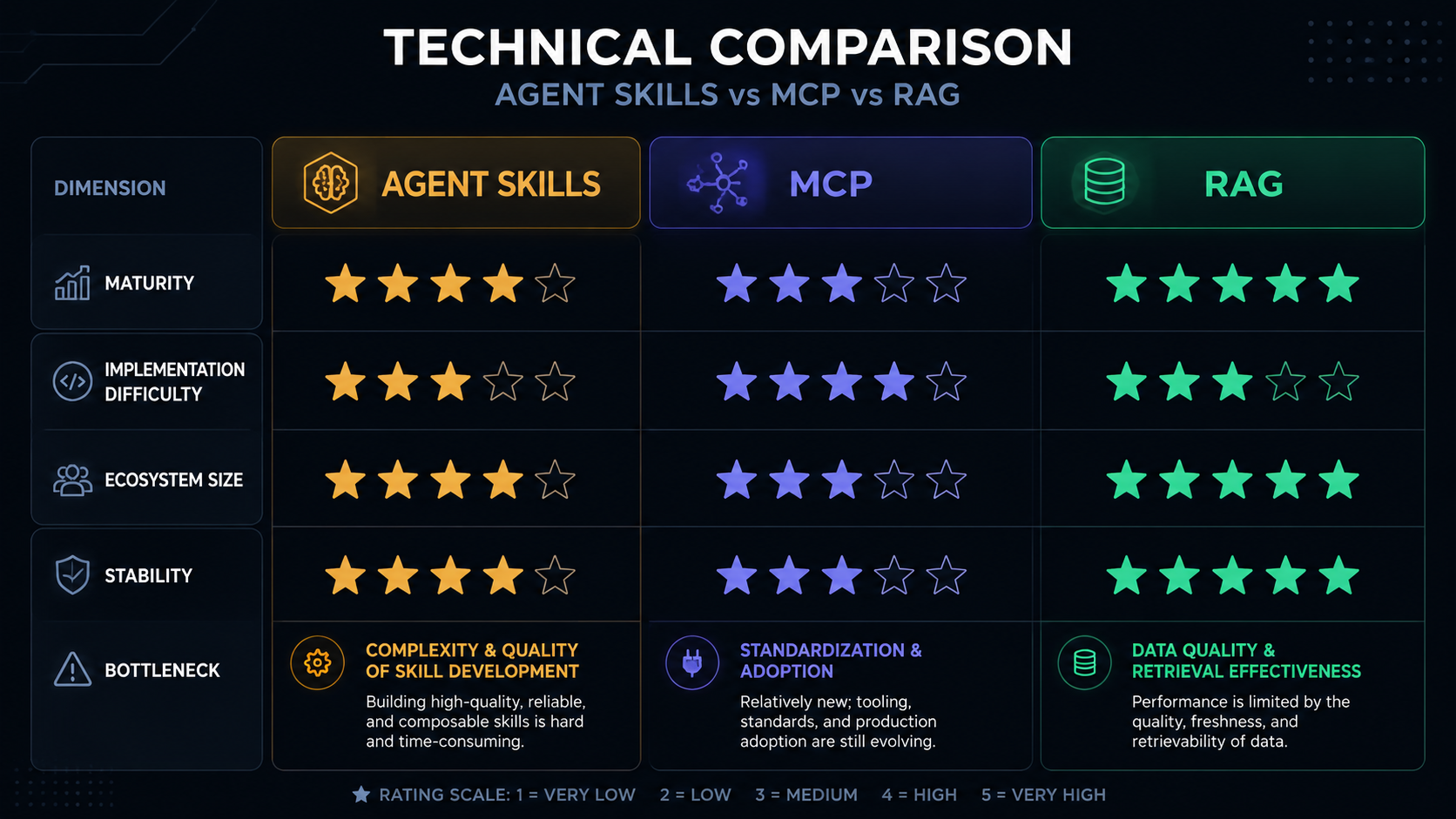
A complete technical comparison of three core patterns for integrating AI systems — how they differ, when to use each, and how to combine them.
✍️ wwAIlab Writer Agent📅 2026-06-01🌐 English Edition
Overview Three Technologies at a Glance — Agent Skills, MCP & RAG
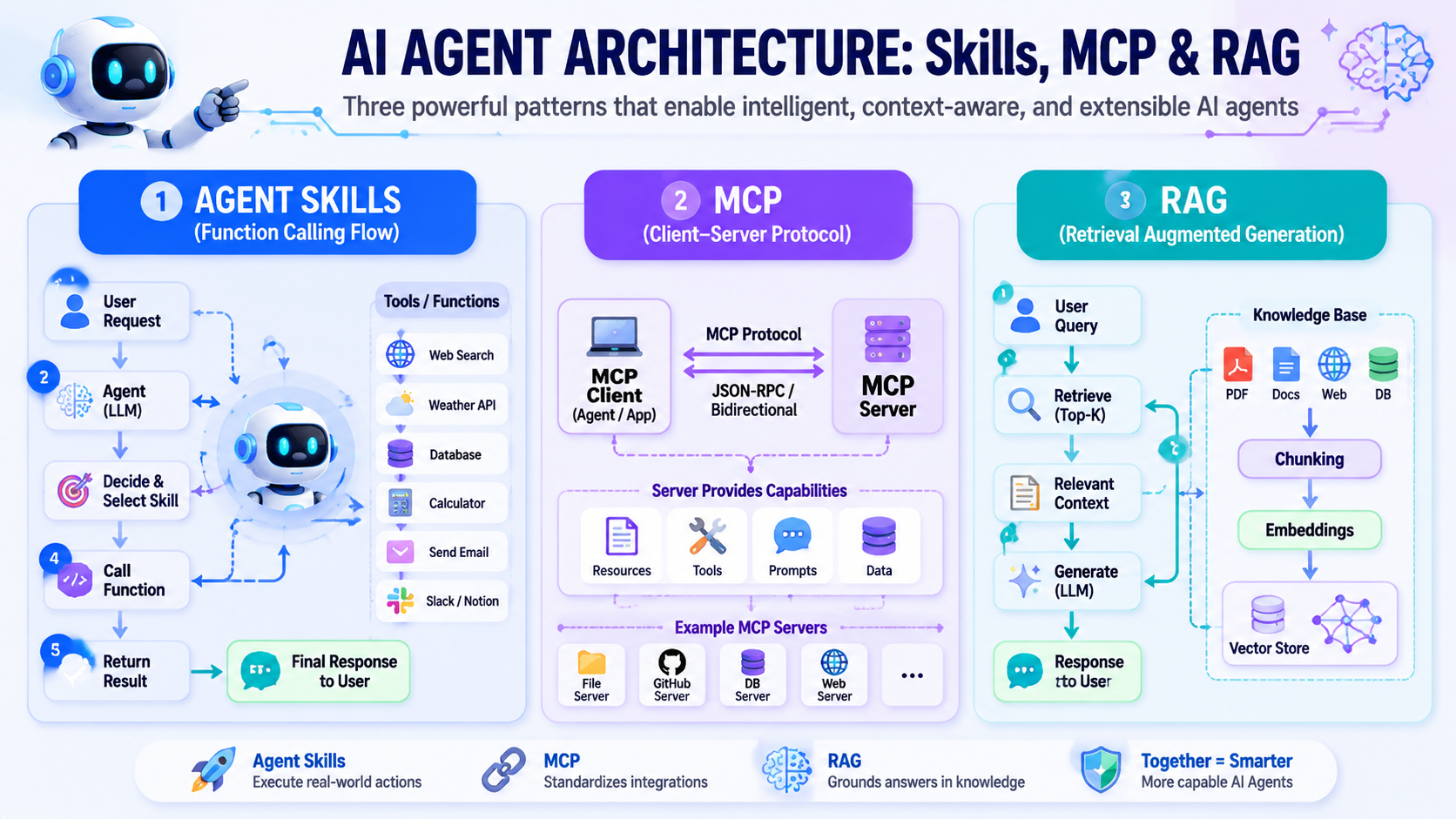
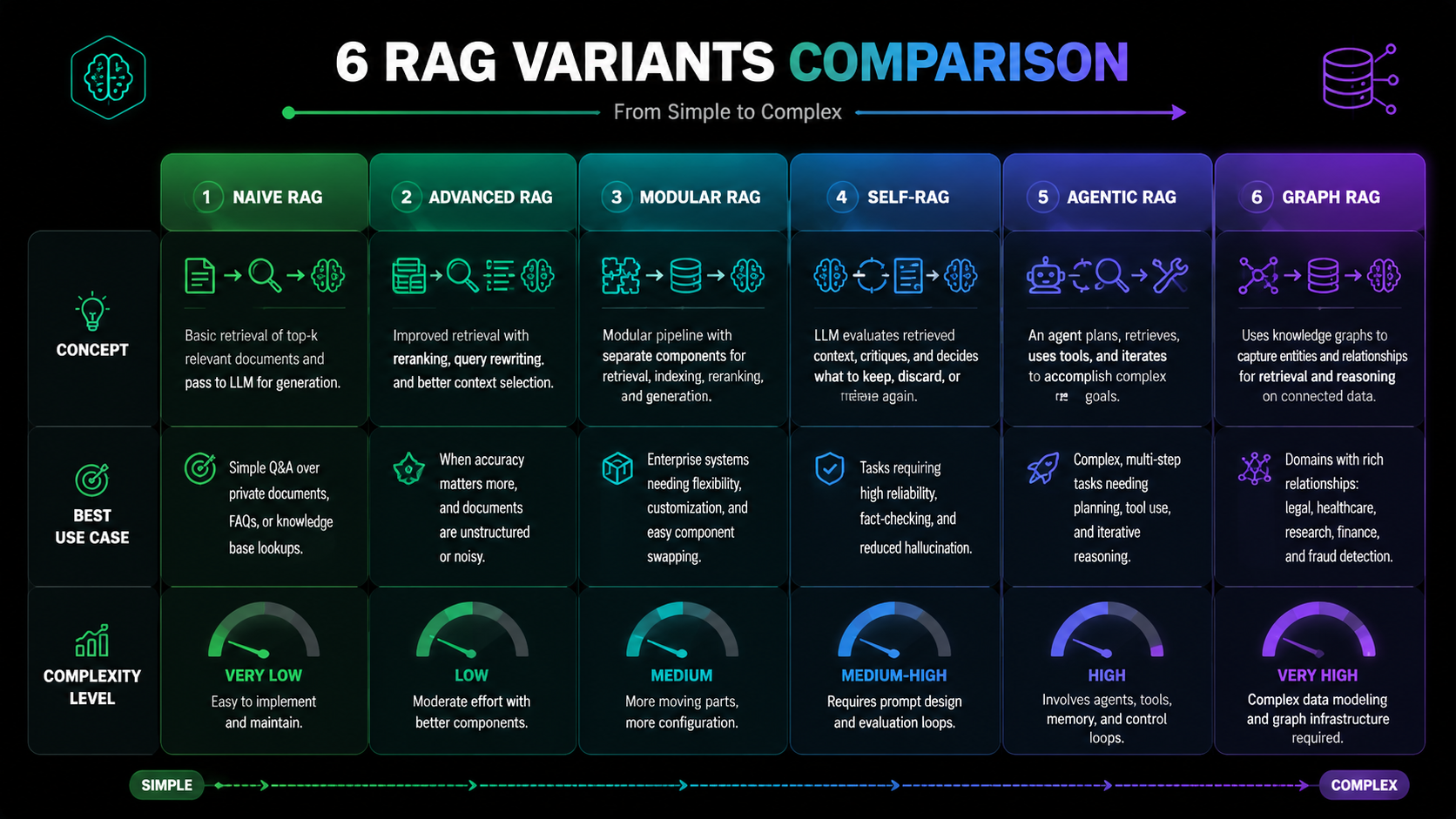
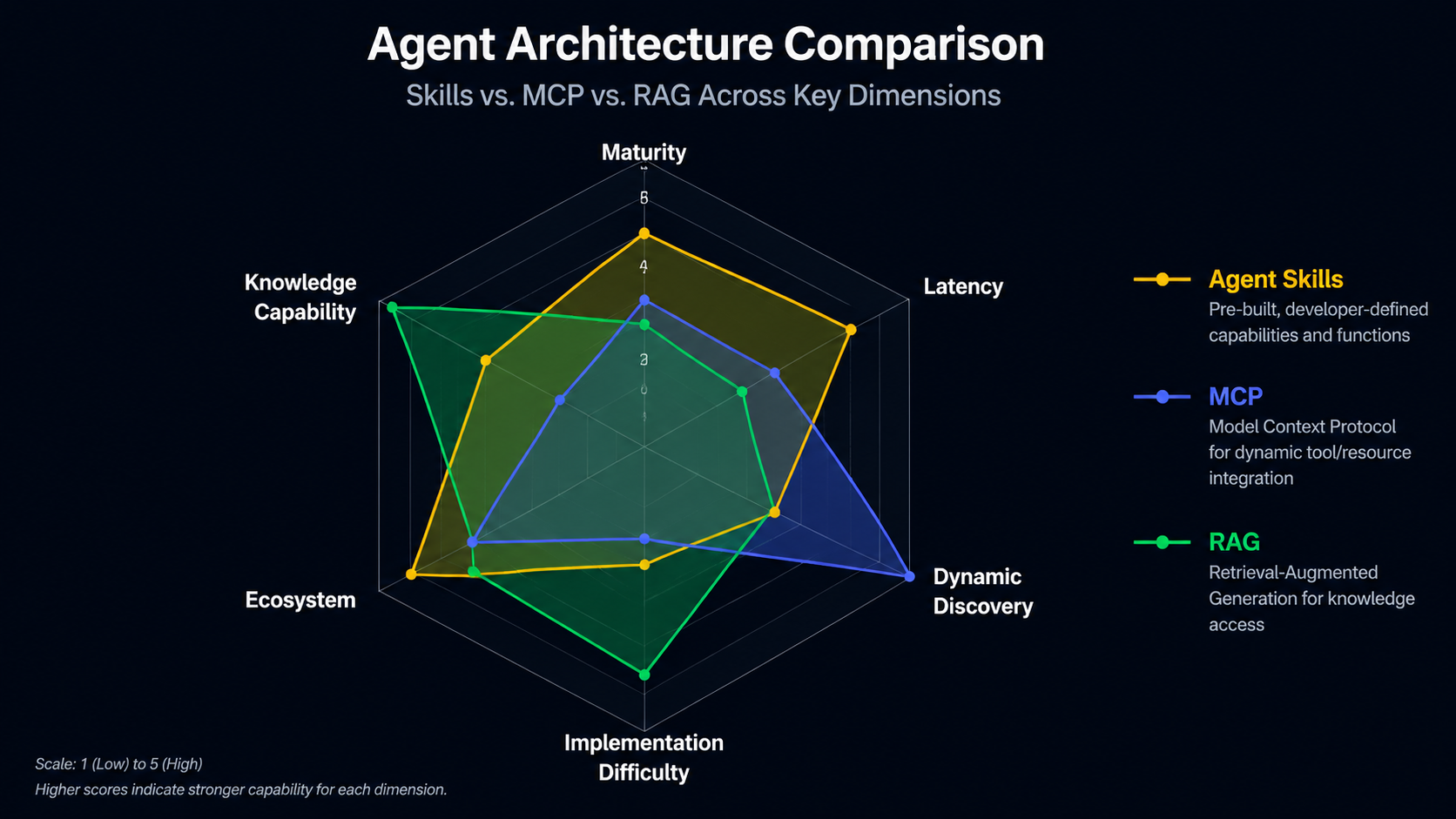
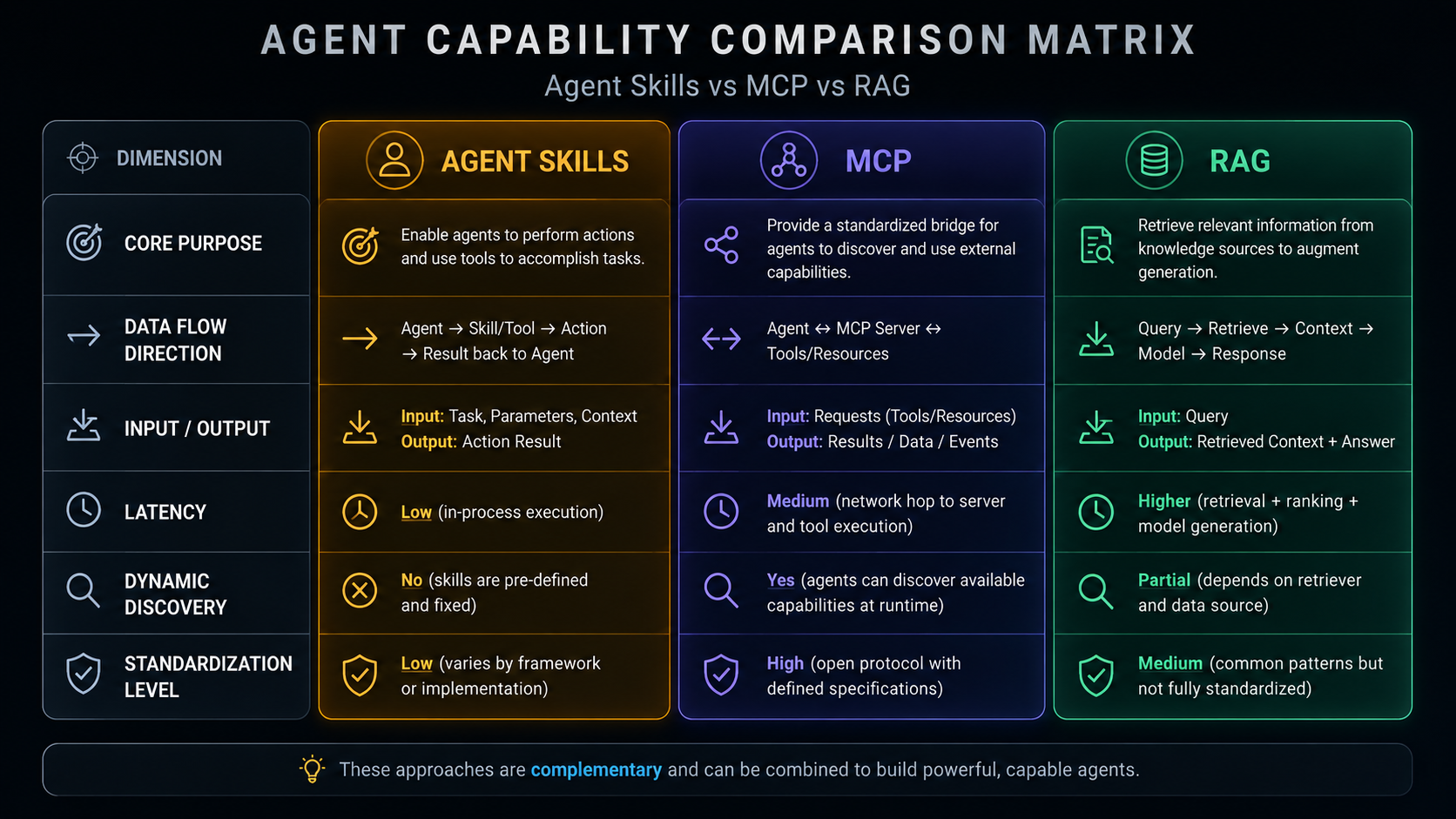
Agent Skills, MCP, and RAG are often discussed as if you must pick one. In reality they answer different questions: Skills are about executing actions, MCP is about standardizing tool communication, and RAG is about supplying knowledge. This document compares all three and shows how a real system (wwAIlab) combines them.
01
Agent Skills — Tool Use & Function Calling
1.1 What are Agent Skills?
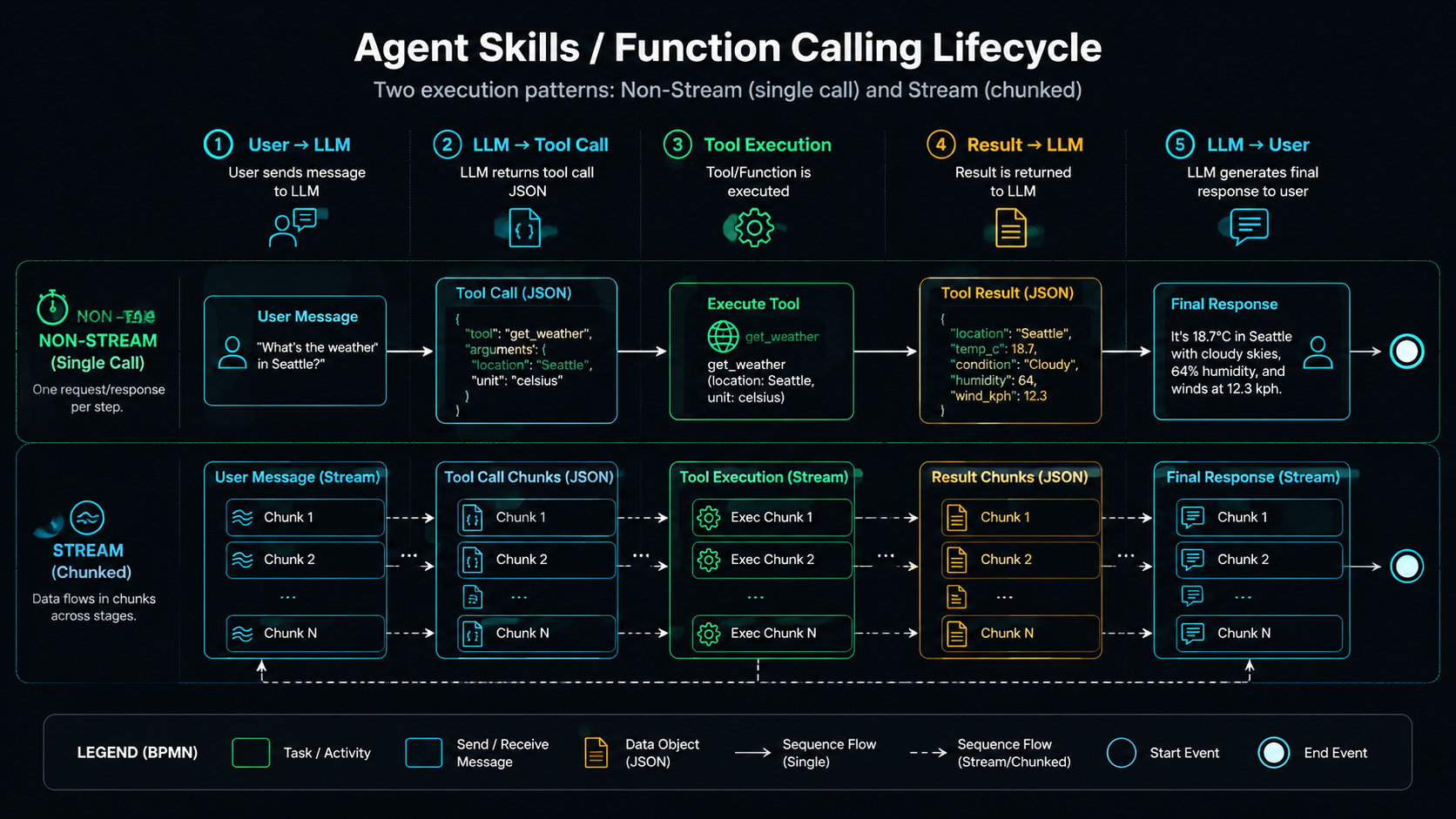
Agent Skills are the core capability of an LLM agent: they let the model do more than just talk — they let it perform actions. The model emits a structured tool-call instruction (usually JSON), the application layer parses it and runs the corresponding function or API, then feeds the result back to the model to continue reasoning.
User Query → LLM → Tool-Call Instruction (JSON) → Execute Tool → Result → LLM → Final Response
Lifecycle The Agent Skills / Function Calling Loop
1.2 How Function Calling Works
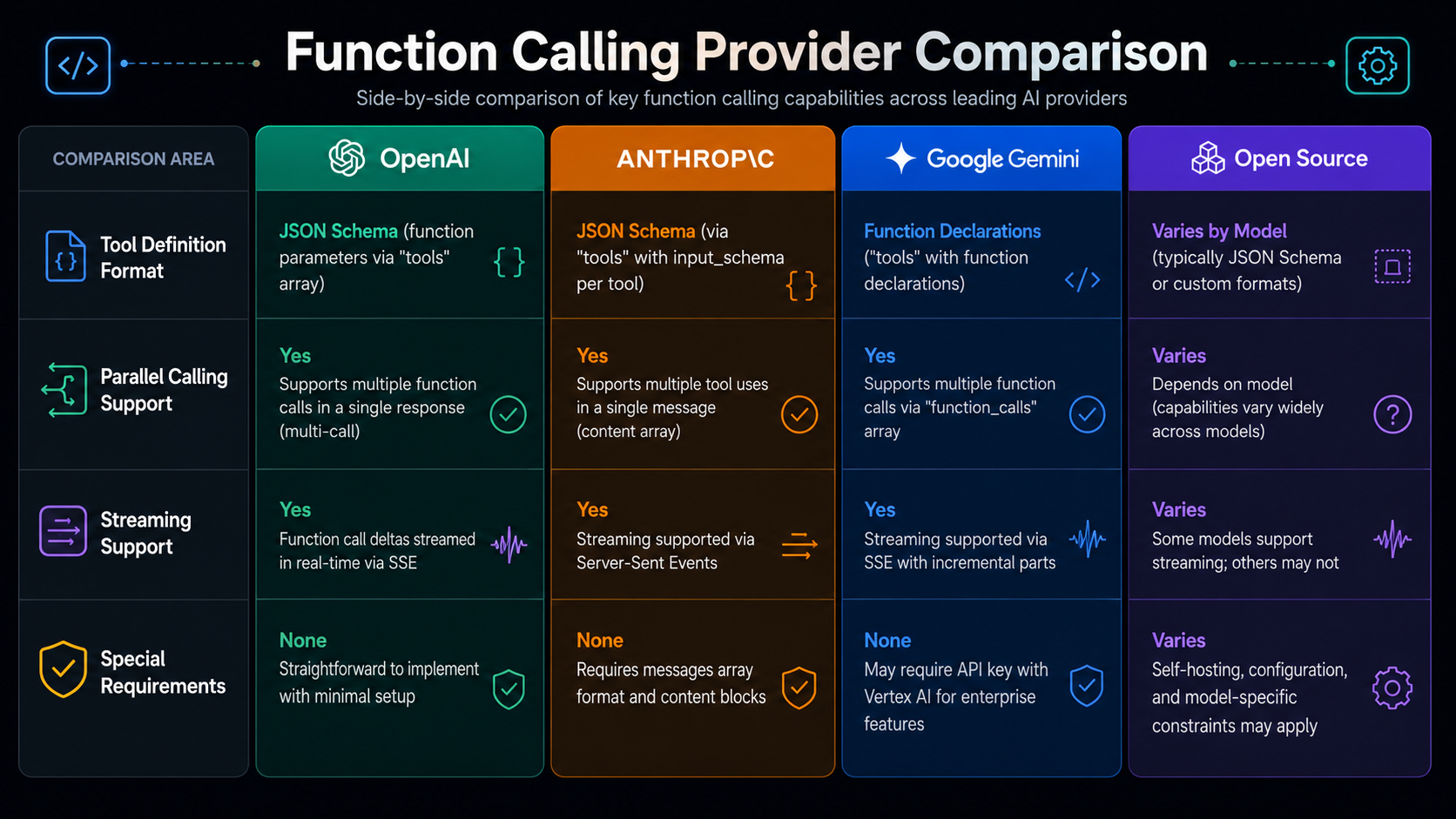
Different LLM providers implement function calling with subtle differences:
Provider
Tool-definition field
Parallel calls
Streaming
Special requirements
OpenAI
tools[].function.parameters
✅ Native
✅ Incremental delta.tool_calls
tool_choice: auto/required/none
Anthropic
tools[].input_schema
❌ One at a time
✅ Full payload sent at once
Results returned as tool_result content block
Google Gemini
FunctionDeclaration
❌ One at a time
✅ Full payload sent
Prefers low temperature=0
Open-source models
Depends on prompt format
Unreliable
❌ Streaming often breaks JSON
Heavy prompt engineering needed
Providers Function Calling Support Across LLM Providers
1.3 Typical Use Cases for Agent Skills
Scenario
Examples
Why it fits
External API calls
Check weather, send email, Slack notify
Clear input/output schema
Database queries
SQL queries, CRM reads
Structured queries, predictable results
Computation tasks
Math, data analysis
Not suited to LLM reasoning — delegate to a dedicated tool
File operations
Read/write files, generate reports
Precise filesystem operations
Workflow triggers
Create a Jira ticket, deploy code
Trigger operations in existing systems
1.4 Strengths & Limitations
✅ Strengths
Low latency (direct call, no middle layer)
Semantically precise (the schema defines behavioral boundaries)
Easy to debug (the tool's return value is the result)
Mature ecosystem (every major LLM supports it)
⚠️ Limitations
Tool list must be pre-defined (hard-coded in code or config)
No standardized inter-service communication (each tool implements its own connection)
Weak dynamic discovery (the agent can only use pre-registered tools)
02
MCP — Model Context Protocol
2.1 What is MCP?
MCP (Model Context Protocol) is an open protocol introduced by Anthropic to standardize how AI applications communicate with external data sources and tools. Think of it as the USB-C of the AI world — a universal connection standard.
The problem MCP solves: In the traditional Agent Skills model, every tool has to implement its own authentication, error handling, and data-format conversion. MCP provides a unified protocol layer so any MCP-compatible client can talk to any MCP server.
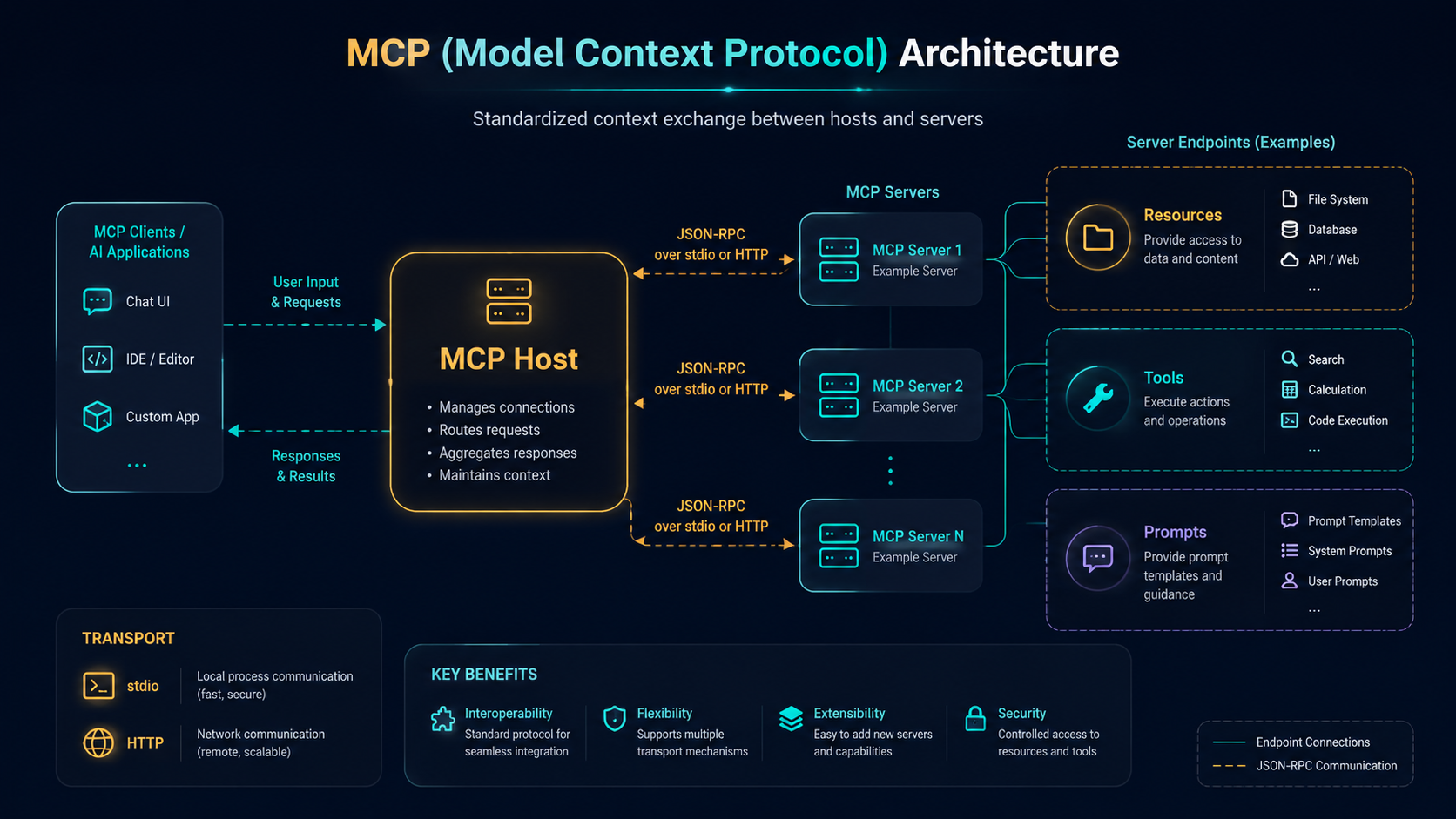
2.2 MCP Architecture
Architecture The MCP Client–Server Model (JSON-RPC over stdio / HTTP)
The app hosting the LLM; talks to servers via the MCP protocol
Claude Desktop, Hermes Agent, VS Code extensions
MCP Server
A service exposing Tools or Resources
Filesystem server, database server, Slack server
Resource
A readable data source (like a GET endpoint)
Documents, logs, database records
Tool
An executable operation (like a POST endpoint)
Send a message, create a record, run a computation
2.3 Transport Mechanisms
Transport
Best for
Pros
Cons
stdio
Local subprocess communication
Zero network setup, low latency
Can't cross machines
HTTP (SSE)
Remote service communication
Cross-network, scalable
Must handle auth & TLS
2.4 The Current Ecosystem
MCP is still early (launched late 2024), but the ecosystem is growing fast:
Official servers: Filesystem, GitHub, Slack, PostgreSQL, SQLite, Puppeteer (browser automation)
Third-party servers: Google Maps, Notion, Obsidian, Airbnb, Stripe
Client support: Claude Desktop (native), VS Code extensions, Hermes Agent (via the native-mcp skill), Continue.dev, Cline
03
RAG — Retrieval-Augmented Generation
3.1 What is RAG?
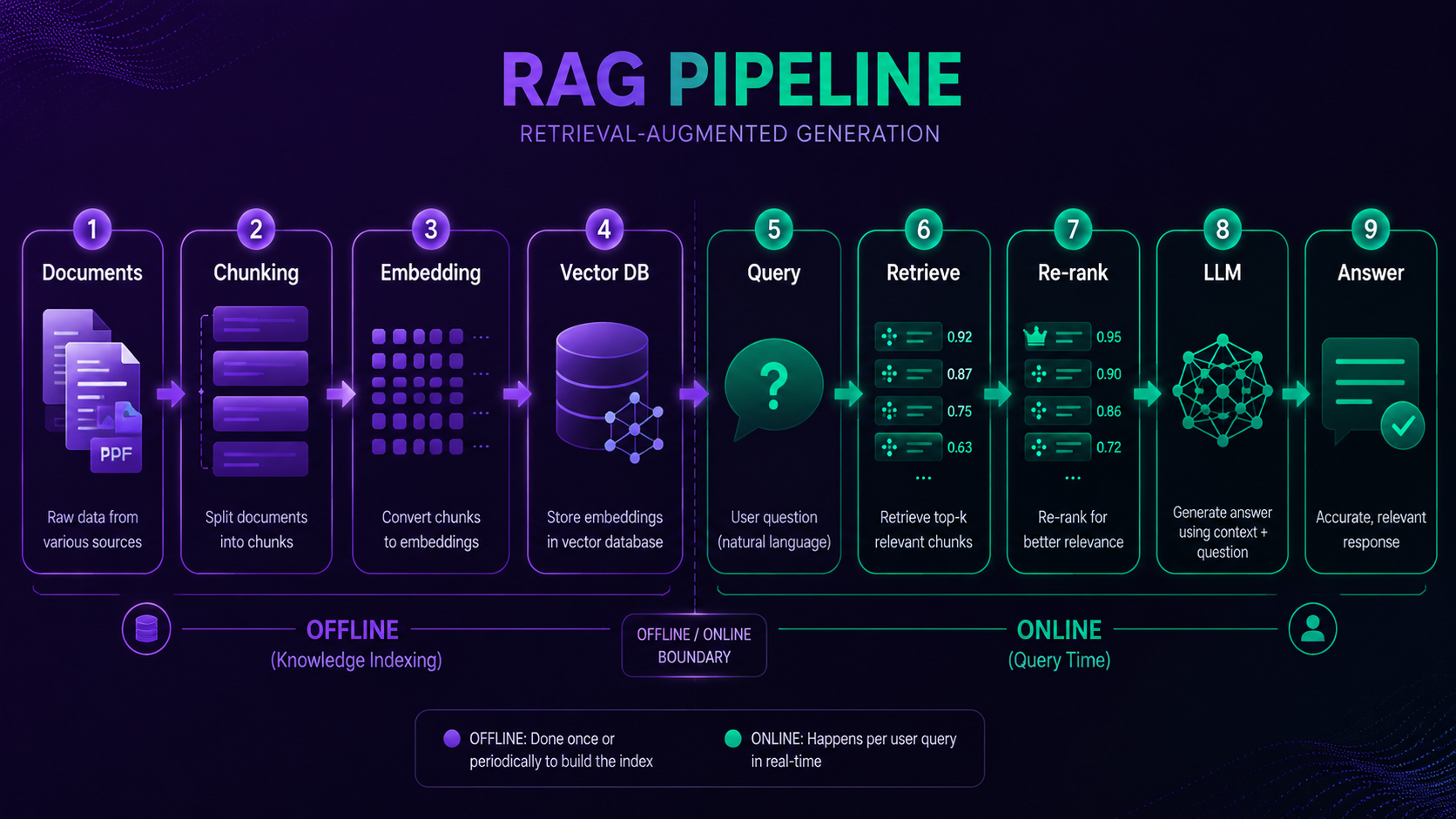
RAG (Retrieval-Augmented Generation) is a technique that lets an LLM retrieve relevant information from an external knowledge base before generating a reply. Rather than making the model "memorize" knowledge, it dynamically injects relevant context at query time.
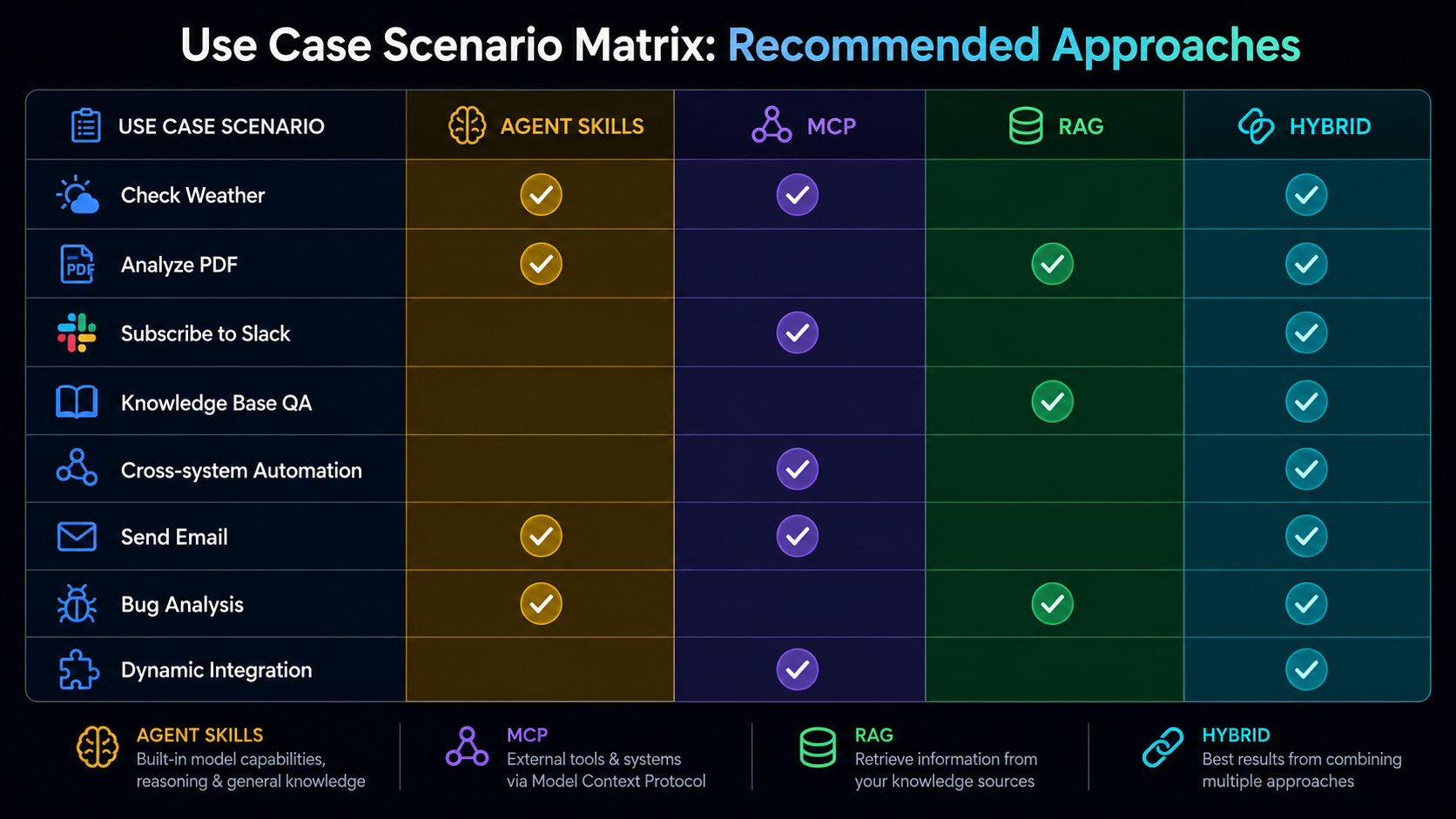
Use Cases Matching Real Questions to the Right Approach
Question type
Recommended
Why
"What's the weather tomorrow?"
Agent Skills
Single API call, clear schema
"Analyze the financials in this PDF."
RAG + Agent Skills
RAG extracts content, Skills run the analysis
"Subscribe me to new messages in Slack #engineering."
MCP
Needs standardized Slack API communication
"Q&A over our internal knowledge base."
RAG
Needs retrieval over private docs
"Read tasks from Notion, update them in Linear."
MCP
Two MCP servers collaborating
"Write an email and send it."
Agent Skills
Simple, clear API call
"Find all issues and code related to this bug."
RAG + Agent Skills
RAG searches knowledge, Skills operate systems
"Dynamically integrate a new tool."
MCP
Just add an MCP server; the client auto-discovers
05
Best Practices — Which, When & Mixing
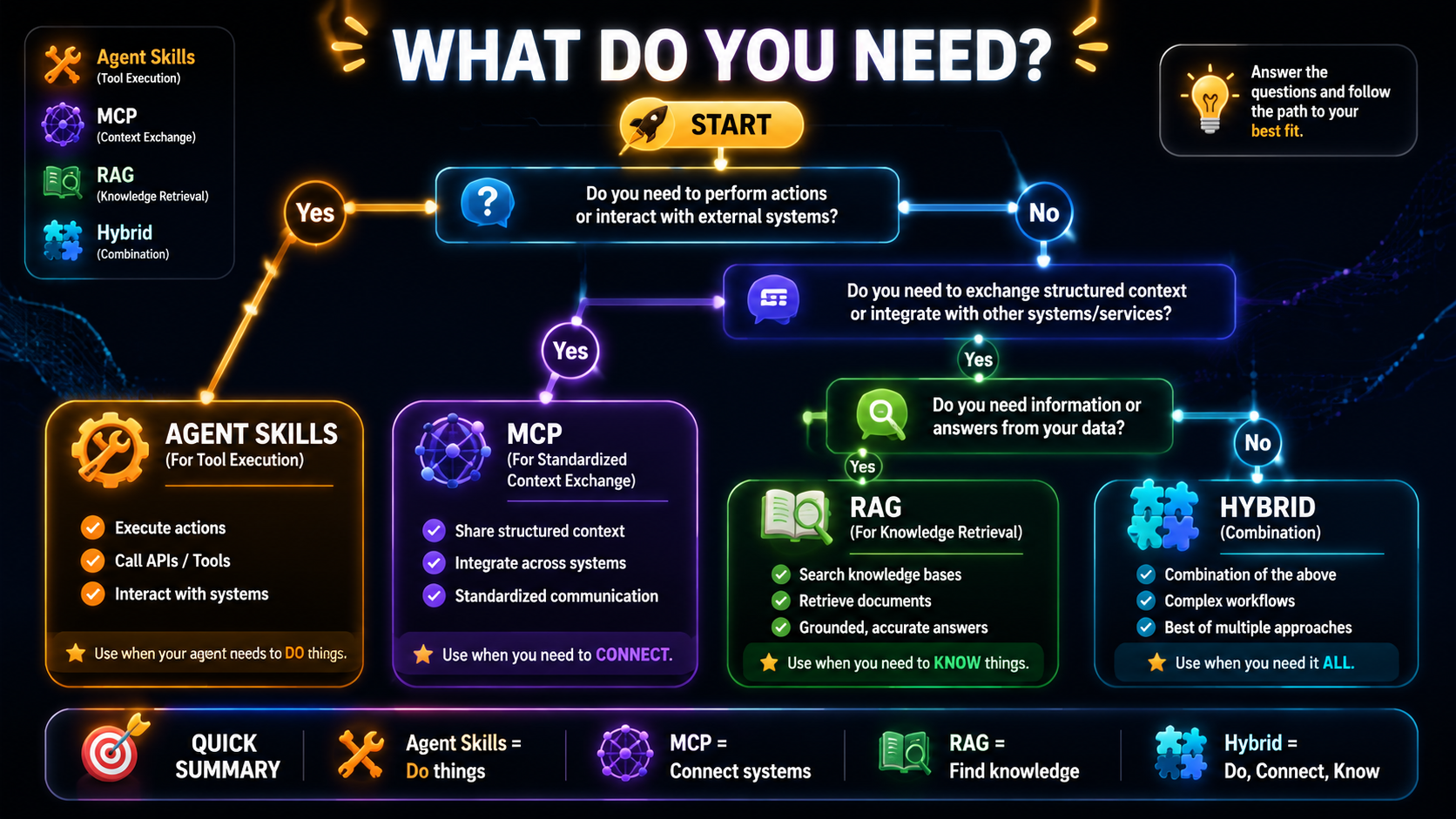
5.1 Decision Framework
Decision Choosing the Right Approach
What do you need?
│
├─ Execute a clear action (send, query, compute)?
│   ├─ Tools are fixed and local → Agent Skills
│   └─ Tools may need dynamic discovery or standardized comms → MCP
│
├─ Supply knowledge the model doesn't have (docs, specs, history)?
│   └─ RAG
│
└─ Both?
    └─ Mix them (see 5.2)
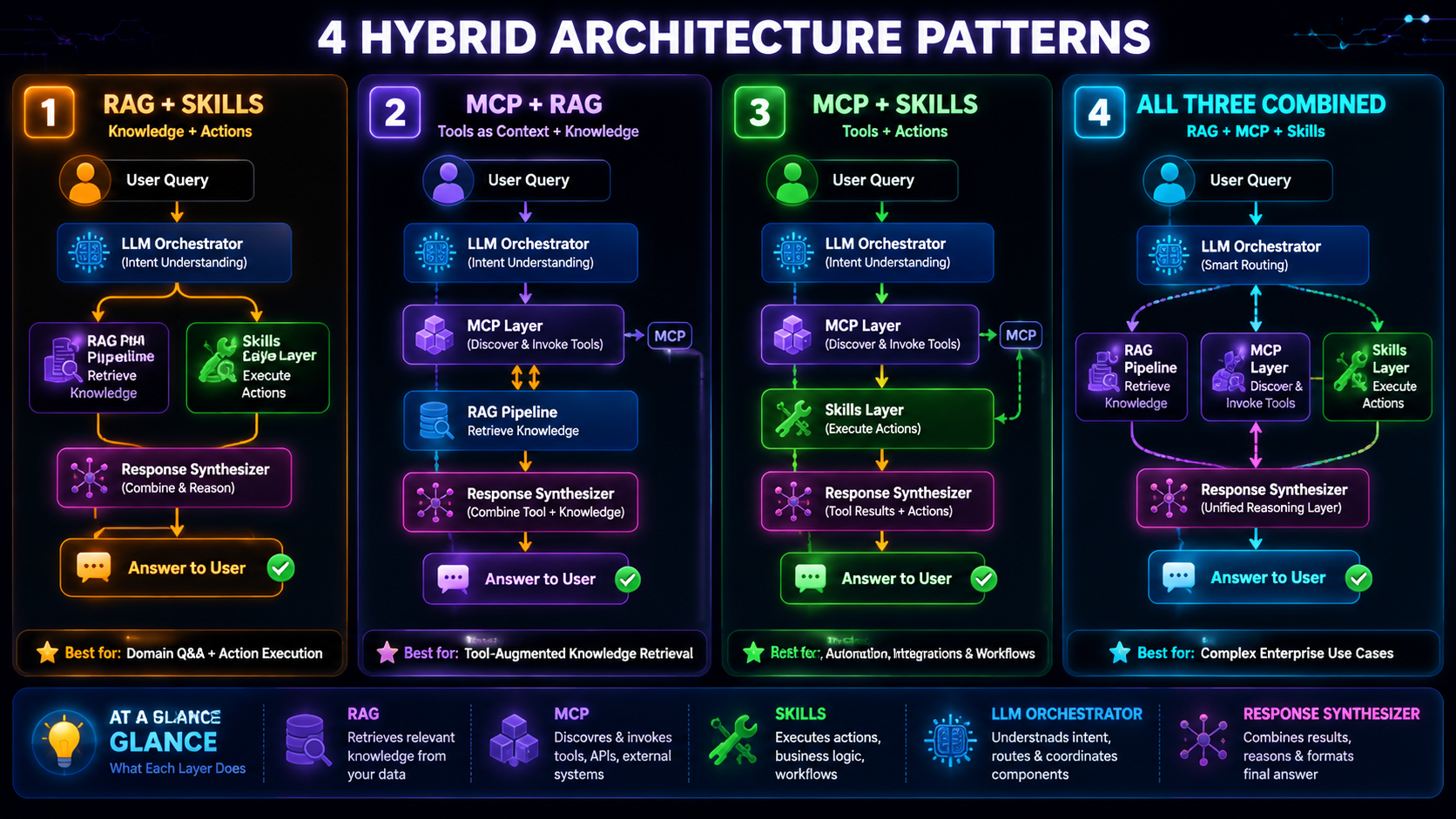
5.2 Hybrid Patterns
These three technologies are not mutually exclusive — in fact they frequently complement each other:
Hybrid Combining All Three in One Architecture
Hybrid pattern
How it works
Example
RAG + Agent Skills
RAG provides knowledge context, Skills execute the concrete action
RAG isn't built to trigger side effects; actions belong to Skills or MCP
Using Agent Skills to handle large knowledge
Skills aren't designed to inject context; knowledge should go through a RAG pipeline
Introducing MCP for one fixed, simple API
MCP adds needless complexity; plain function calling is lighter
Hard-coding sensitive API keys in Skill definitions
Manage via environment variables or MCP's security layer
06
Case Study — wwAIlab's Hybrid Architecture
6.1 The wwAIlab Tech Stack
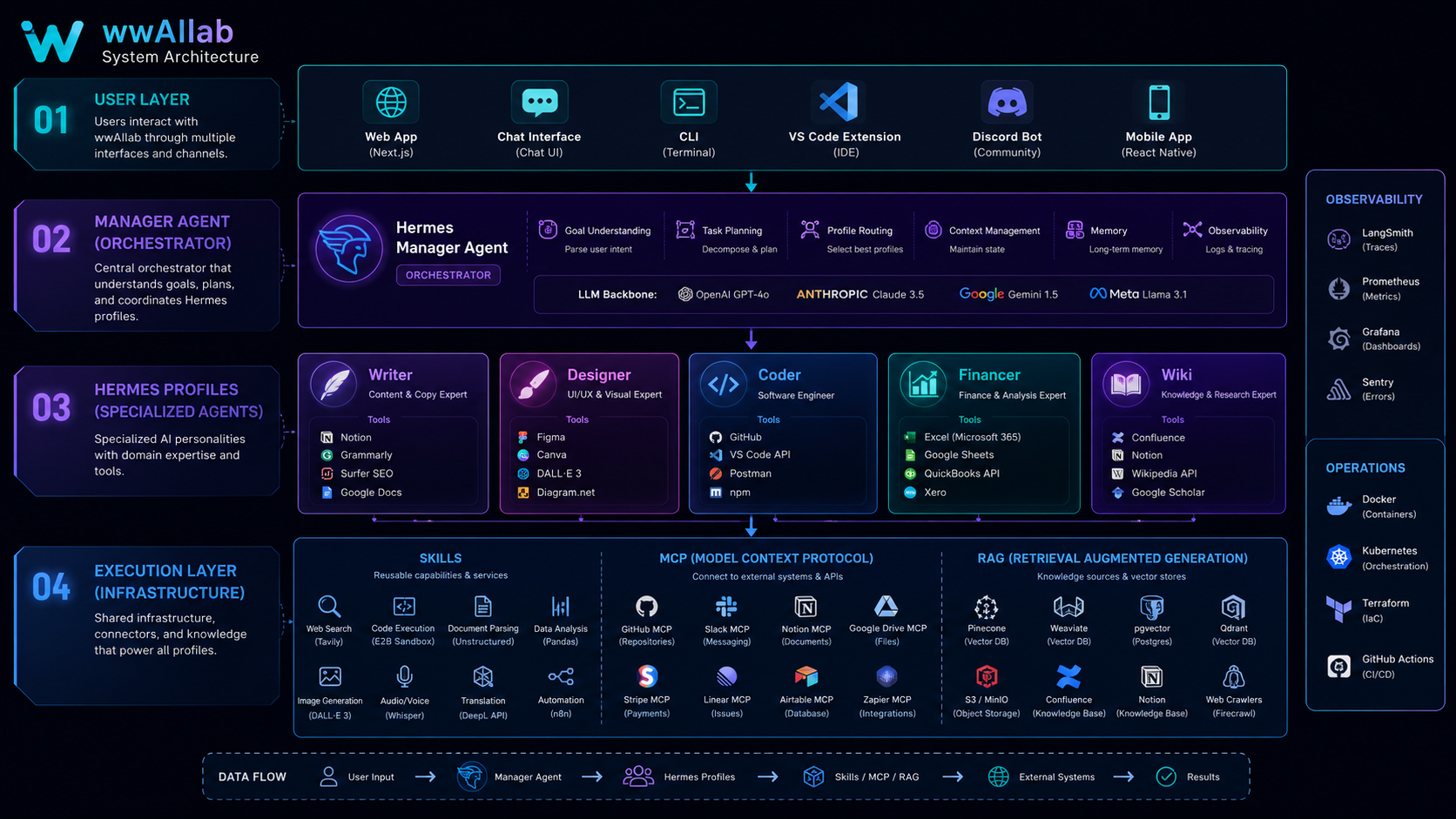
wwAIlab is a multi-agent collaboration system driven by the Hermes Agent framework. In practice all three technologies are used, each responsible for a different layer:
Scenario: The user asks — "About the MCP architecture we discussed last time, pull up my earlier notes, then summarize it to Slack."
1. RAG retrieval stage
   → Search wiki/concepts/ in the LLM Wiki for MCP-related pages
   → Return existing knowledge (session logs, concept pages, implementation notes)

2. Agent Skills stage
   → skill: wwAIlab-wiki reads the specific source files
   → Do additional local file processing

3. MCP stage (if a Slack MCP server exists)
   → Call the Slack API via the MCP protocol
   → Send the summary to the target channel
6.4 wwAIlab's Guiding Principles
The architecture follows these principles:
Local first: prefer Agent Skills (low latency, zero network dependency).
Standardized comms go through MCP: when talking to external services, use MCP over custom integrations.
Knowledge goes through the wiki: all persistent knowledge is managed via the LLM Wiki (RAG mode), not fine-tuning.
The Manager only routes: the Manager profile only decomposes, assigns, and merges tasks — it does no specialist work.